How Far Can a CCTV Camera See? Detection and Identification Distances by Resolution and Lens
TL;DR
- A 1080p (2 MP) camera with a 68° lens can show that a person is there out to about 57 m (187 ft), but can identify who it is only out to about 6 m (19 ft).
- The lens angle moves these numbers the most: the same 2 MP camera identifies a face to about 3 m (11 ft) with a 100° wide lens and to about 14 m (47 ft) zoomed in to 30°.
- Distance scales with horizontal pixels, so an 8 MP (4K, 3840×2160) camera doubles every distance at the same lens angle, identifying to about 11 m (37 ft) at 68°.
- In Korea's national CCTV dataset, 93.6% of the records that list a resolution are 2 MP, and only 2.7% of all records state how far the camera covers.
 See CCTV near you on ViewconeOpen the map
 A 1080p (2 MP) CCTV camera with a 68° lens can show that a person is present out to about 57 m (187 ft), but can identify who it is only out to about 6 m (19 ft). The camera records much farther than that; people just become too small to make out. Two numbers decide these distances: how many pixels the camera has across the image and how wide its lens angle is. 68° is a mid-range angle, and it is the default my CCTV map, Viewcone, assumes when a camera's lens is unknown (a modeling choice, not a measured average). Zooming in narrows the view and extends every distance; a wide-angle lens does the opposite.
The figures below come from the pixel-density levels of the IEC 62676-4 video surveillance standard, as tabulated by Axis Communications, and you can redo them for any camera with its datasheet. At the end I set them against Korea's public camera network, which is what Viewcone maps.
DORI: the four levels of detail
Surveillance planning names four levels of detail: detection, observation, recognition and identification (DORI). Axis's whitepaper on IEC 62676-4:2014 defines each by how many pixels fall across a human face, then converts that to pixels per meter assuming an average face is 16 cm (about 6.3 in) wide.
| Level | What you can tell on screen | Pixels per face | Pixels per m | Pixels per ft |
|---|---|---|---|---|
| Detection | Whether a person is there | 4 | 25 | 7.6 |
| Observation | How many people, distinctive clothing | 10 | 63 | 19.2 |
| Recognition | Whether it is someone you have seen before | 20 | 125 | 38.1 |
| Identification | Who the person is | 40 | 250 | 76.2 |
The pixels-per-ft column is my exact conversion of the per-meter values (1 m = 3.28084 ft). Axis's table prints rounded values (8, 20, 40 and 80) and notes that its product datasheets use 19, 38 and 76. Axis also says these levels assume a person watching the video; video analytics and thermal cameras use other definitions.
Distance by resolution and lens angle
The farther away a person stands, the fewer pixels land on each meter of the scene. The distance at which a level is still met is:
distance (m) = horizontal pixels ÷ (2 × tan(horizontal field of view ÷ 2) × pixels per m)
| Resolution | Horizontal field of view | Detection | Observation | Recognition | Identification |
|---|---|---|---|---|---|
| 1920×1080 (2 MP, 1080p) | 100° | 32 m (106 ft) | 13 m (42 ft) | 6 m (21 ft) | 3 m (11 ft) |
| 1920×1080 (2 MP, 1080p) | 68° | 57 m (187 ft) | 23 m (74 ft) | 11 m (37 ft) | 6 m (19 ft) |
| 1920×1080 (2 MP, 1080p) | 30° | 143 m (470 ft) | 57 m (187 ft) | 29 m (94 ft) | 14 m (47 ft) |
| 2560×1440 (about 3.7 MP) | 100° | 43 m (141 ft) | 17 m (56 ft) | 9 m (28 ft) | 4 m (14 ft) |
| 2560×1440 (about 3.7 MP) | 68° | 76 m (249 ft) | 30 m (99 ft) | 15 m (50 ft) | 8 m (25 ft) |
| 2560×1440 (about 3.7 MP) | 30° | 191 m (627 ft) | 76 m (249 ft) | 38 m (125 ft) | 19 m (63 ft) |
| 3840×2160 (8 MP, 4K) | 100° | 64 m (211 ft) | 26 m (84 ft) | 13 m (42 ft) | 6 m (21 ft) |
| 3840×2160 (8 MP, 4K) | 68° | 114 m (374 ft) | 45 m (148 ft) | 23 m (75 ft) | 11 m (37 ft) |
| 3840×2160 (8 MP, 4K) | 30° | 287 m (940 ft) | 114 m (373 ft) | 57 m (188 ft) | 29 m (94 ft) |
Distance grows in step with horizontal pixels, so doubling the width from 1,920 to 3,840 pixels doubles every distance (identification at 68° goes from 5.7 m to 11.4 m). Narrowing the lens from 68° to 30° helps more than going from 2 MP to 4K. Feet are converted from the unrounded meter values.
These are resolution limits only. Lighting, weather and video compression are not in the formula, so real footage can fall short of them.
Finding your own camera's field of view
You need two numbers from the camera's datasheet:
- Horizontal pixels: the first number of the resolution (1920 in 1920×1080).
- Horizontal field of view in degrees: use the horizontal figure if the sheet lists several. A varifocal or zoom lens lists a range from wide to tele; use the angle the camera is actually set to.
Axis notes that datasheets of its newer cameras already list DORI distances, calculated at the center of the image with lens distortion taken into account, and it offers an online lens calculator for coverage and pixel density at a given distance.
What Korea's public cameras say about range
Korea's Ministry of the Interior and Safety publishes the public CCTV records that local governments manage in the national CCTV standard dataset (전국CCTV표준데이터). I counted all 381,036 records in the file downloaded 2026-09-20. 76,575 (20.1%) leave the resolution field blank; the 304,461 that fill it in are overwhelmingly 2 MP:
| Listed resolution | Records | Share |
|---|---|---|
| 2 MP | 284,926 | 93.6% |
| Above 2 MP | 14,676 | 4.8% |
| Below 2 MP | 3,434 | 1.1% |
| Values under 10 (apparently another unit) | 1,425 | 0.5% |
| Total with a resolution | 304,461 | 100% |
So the 2 MP rows of the distance table fit most of the records that list a resolution, assuming the usual 1920×1080, and the lens angle picks the row. The dataset has no field-of-view column, and only some agencies write an angle or a distance into the free-text shooting-direction field (촬영방면정보).
Almost half the records (47.7%) leave that field blank, and 95% of the filled ones give no distance, saying things like "360°" or "fixed" (I covered how agencies fill it in How Accurate Is Korea's Public CCTV Dataset?). Only 10,233 records (2.7%) state a distance, most often 50 m (6,708 records) or 100 m (2,653). They come from 24 local governments, and 12 of them account for 95%.
A "130 m coverage" figure on a sign or a spec sheet is not an identification distance. Seoul's Guro-gu, in its camera operating policy revised December 17, 2024, lists coverage within 130 m for its 1,800 public-safety sites in parks, school zones and crime-prone areas, within 160 m for 156 traffic sites, and within 30 m or 10 m for cameras at building entrances and illegal-dumping spots. To detect a person at 130 m (427 ft), a 2 MP camera would have to narrow its view to about 33°; to identify one, to about 3°. A figure like 130 m is best read as how far a camera can point or zoom, not where it recognizes faces.
If you live in Korea
Korea's Personal Information Protection Act, Article 25(4), requires anyone operating a fixed camera in a public place to put up a sign (or take similar steps) showing the purpose and location, the recording range and hours, and a contact for the person in charge; military facilities, national key facilities and other sites set by decree are exempt. Operators also need a camera operating policy (or a section in their privacy policy) that lists the number, locations and coverage of their cameras and goes on their website. For public cameras, that means the websites of city, county and district offices. To find one, search the office's site for "영상정보처리기기 운영·관리 방침" (the policy's Korean title) with the area name, or ask the office named on the sign.
To find where cameras are, see How to Check CCTV Locations Near You in Korea. To get footage of yourself, see How to Request CCTV Footage in Korea.
Buildings and direction matter more than distance
A camera that can detect a person at 57 m still sees nothing behind a wall 10 m (33 ft) away. And if you do not know which way it faces, anywhere in a circle tens of meters in radius around it is a candidate. This is how Viewcone handles both:
- Distance: where an agency published a range in a form the map reads, it uses it (7,287 map sites; the map reads fewer distance patterns than my count and merges records at the same spot, so the number is lower than 10,233). Otherwise it uses 55 m (180 ft), a little short of the 57 m detection distance, with a 68° view where the bearing is known.
- Buildings: the view stops where it hits a building outline, so coverage follows the shape of the street.
- Direction: only 792 of the 258,376 map sites (0.3%) have a published bearing. 49,622 (19.2%) are listed as 360° or all-direction (전방향), and 207,962 (80.5%) have no usable direction (blank, or text such as "fixed" or "rotating" without a bearing). For those two groups the map shades a "possible range": the area the camera could cover if it faced that way.
Being inside a possible range does not mean a camera is recording you. So when your location falls only inside possible ranges, and not inside the range of a camera with a published bearing, Viewcone says it cannot tell whether a camera is pointing your way.
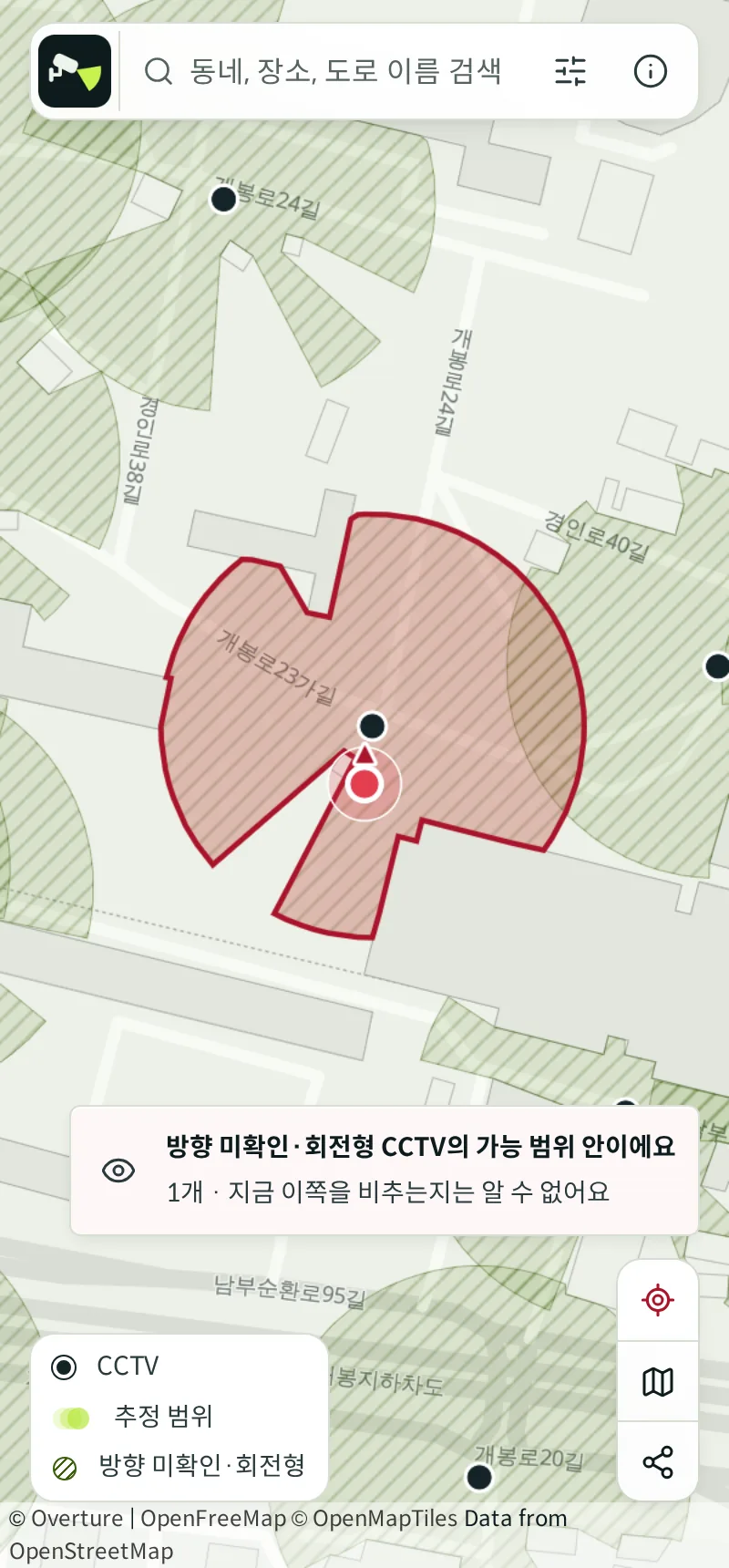
On Viewcone, search for a neighborhood in Korean (for example 개봉동) or tap the location button to see nearby cameras and their estimated coverage. Where an agency published coordinates only to about 100 m or 1 km, a drawn range could land on the wrong street, so those cameras appear as faded points instead.
Method
- Data: Korea's national CCTV standard dataset (Ministry of the Interior and Safety, data.go.kr 15013094), the CSV downloaded 2026-09-20 with 381,036 rows. Viewcone's map uses this file too. Resolution and direction are listed per row, so every raw row was counted.
- Resolution unit: the dataset page does not state the unit of the resolution field. Common values include 200, 300, 500, 800, 120, 900, 400 and 41, which match common camera specs (0.41 to 9 MP) in units of 10,000 pixels, so I read them that way. "Above 2 MP" groups 201 to 499 (7,393), 500 to 799 (3,463) and 800 and up (3,820); "below 2 MP" groups 10 to 99 (791) and 100 to 199 (2,643). Values under 10 are counted separately. Shares are rounded to one decimal.
- Stated distances: a number followed by m, M or 미터 (meters) in the shooting-direction field counts as a distance; when a field has several, the largest is used ("2~50M 전방" counts as 50 m). A few records give the distance to a landmark (for example 350 m upstream of a bridge); they do not change the 2.7%. Local governments are grouped by their government code.
- Distances: computed from the IEC 62676-4 pixel densities as tabulated by Axis (25, 63, 125 and 250 pixels per meter) with 1,920, 2,560 and 3,840 horizontal pixels. The dataset has no field-of-view column, so 100°, 68° and 30° are example lenses.
- Map counts (258,376 sites, 792 with a published bearing, 49,622 listed as 360° or all-direction, 7,287 with a published range) come from the data Viewcone currently serves.
Sources
- Pixel density based on IEC 62676-4:2014 - Axis Communications whitepaper (DORI levels, pixels per face, per meter and per foot, 16 cm face width, datasheet DORI distances, lens calculator)
- National CCTV standard dataset (전국CCTV표준데이터) - Ministry of the Interior and Safety, data.go.kr
- Personal Information Protection Act (개인정보 보호법), Article 25(1), (4) and (7) - Korea Ministry of Government Legislation
- Enforcement Decree of the Personal Information Protection Act (개인정보 보호법 시행령), Article 25 (camera operating policy) and Article 31(2) and (3) (how the policy is published, applied by Article 25(2))
- Guro-gu camera operating policy - Guro-gu, Seoul, revised 2024-12-17
- Law texts were checked against the current versions on law.go.kr on 2026-10-19.
See CCTV near you on ViewconeSearch a neighborhood, place or street name to see public CCTV locations and estimated coverage. Free, no sign-up.Open the map In the Android app, the map and place search work offline. Get it on Google Play