How to Check CCTV Locations Near You in Korea (Free Map)
TL;DR
- Search a neighborhood or address on Viewcone (cctv.devrives.com) to see about 260,000 public CCTV sites across Korea, free and without sign-up.
- Tap a site to see its purpose, such as crime prevention or child safety, and the agency that manages it.
- Cameras missing from the map may be undisclosed public cameras or private ones, so ask the local government about those.
 See CCTV near you on ViewconeOpen the map
 To see public CCTV locations in your Korean neighborhood, open Viewcone (보는지도) and search a neighborhood name or address. About 260,000 public CCTV sites from the Ministry of the Interior and Safety's open data appear on the map, free and without sign-up, and tapping a site shows its purpose (crime prevention, for example) and the agency that manages it.
Jump to a province: Seoul · Busan · Daegu · Incheon · Daejeon · Ulsan · Sejong · Gyeonggi · Gangwon · North Chungcheong · South Chungcheong · Jeonbuk · Jeonnam and Gwangju · North Gyeongsang · South Gyeongsang · Jeju
Maybe you are checking out a neighborhood before moving, worried about walking home at night, or wondering whether a camera caught an accident. There are three main ways to find public CCTV in Korea.
| Method | Strength | Limitation |
|---|---|---|
| 1. Free map (Viewcone) | One address search shows nearby cameras | Shows only public CCTV that local governments disclosed |
| 2. Raw open data | Includes every field, down to managing agency contacts | A CSV file, hard to read as a map |
| 3. Ask the local government | Can cover locations that are not published | Takes time to get an answer |
1. See CCTV near you on a free map
Viewcone puts the Ministry's open data on a free interactive map. Using it takes three steps:
- Open cctv.devrives.com.
- Type a neighborhood, address, or place name into the search box.
- When the map moves there, tap a CCTV site to see its purpose (crime prevention, child safety, and so on) and its managing agency. Tap "자세히" (details) for the published camera direction, equipment type and coordinates.
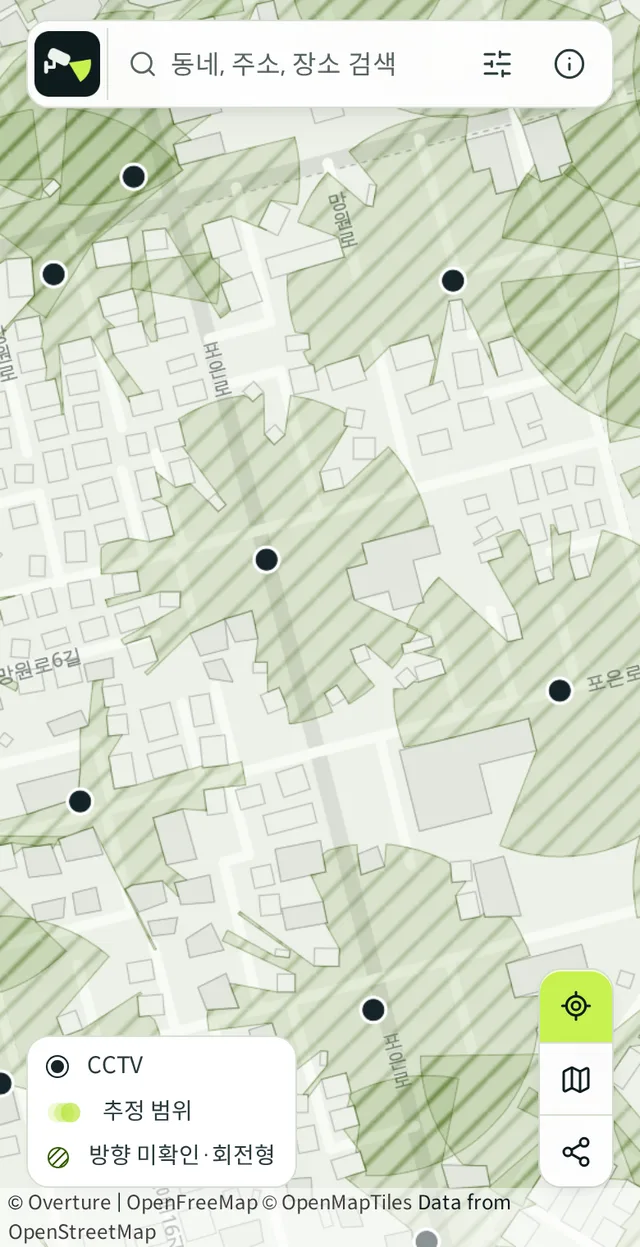
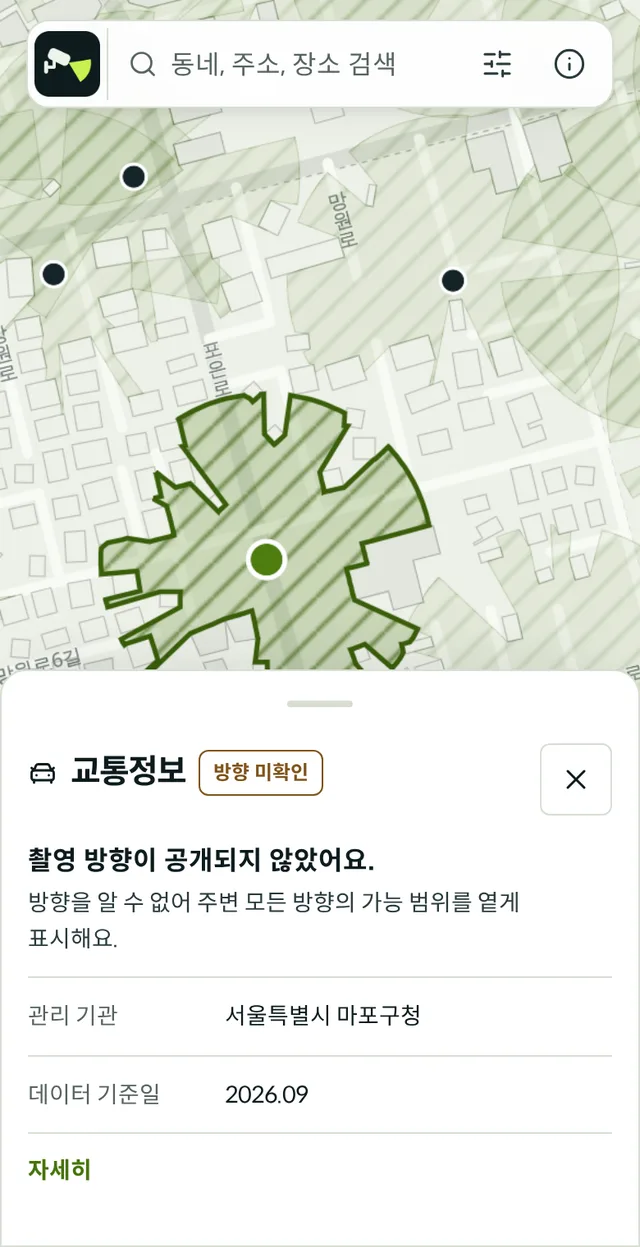
Province and city or district breakdowns are on the region index. For example, the Seoul or Suwon, Gyeonggi pages take you straight to that area on the map. Page text is in Korean, but the map itself is easy to use without it.
2. Check the raw open data
The Ministry of the Interior and Safety publishes the public CCTV records registered by local governments nationwide as the national CCTV standard dataset (전국CCTV표준데이터) (Korean). It includes installation addresses, camera counts, purposes, and managing agency contacts. That makes it useful when you need an agency's phone number, but the raw file is a CSV and is hard to browse as a map.
3. Ask the local government
If a location is not in the open data, the local government chose not to publish it. You can file an information disclosure request (정보공개청구) with the city, county, or district office, or contact its integrated control center (통합관제센터). Private CCTV, such as cameras installed by shops or apartment complexes, is not part of the open data.
Things to know
- Each local government decides how much to publish, so an empty spot on the map does not mean there is no camera. The underlying file also has known data-quality gaps.
- Records reflect when a camera was registered, so moved or removed cameras can linger in the data.
- Knowing where a camera is and viewing its footage are separate things. Footage requests go to the managing agency.
Data source
- National CCTV standard dataset - data.go.kr (Ministry of the Interior and Safety, Korean)
- The Viewcone map and the "about 260,000 sites" in this post use data downloaded 2026-09-20 (258,385 sites; most recent record base date 2026-09-16). It is information registered by local governments and may differ from what is actually installed.
FAQ
Can I see only crime prevention cameras?
The open data includes each site's purpose (crime prevention, child safety, traffic enforcement, and so on). On Viewcone, the filter button to the right of the search box lets you pick purposes; keep only 생활방범 (crime prevention) to show just those cameras. Tapping a site also shows its purpose.
How do I check whether a specific place has a CCTV camera?
Search that place's address on the map and look at the nearby sites. If nothing shows up, the camera may be a public one outside the published data, or a private one at a shop, apartment, or parking lot. For public cameras, ask the district office or its integrated control center; for private ones, ask the building management office.
Can I watch my neighborhood's CCTV live?
No. Crime prevention footage contains personal information and is not streamed to the public. Viewcone shows locations only, never video. Some traffic cameras that show road conditions are streamed live by traffic information services such as the National Transport Information Center (국가교통정보센터).
I was in an accident. Can I see footage from a nearby camera?
Once you know where the camera is, request the footage from the agency that manages it. Retention periods are often short, so apply as soon as possible. The steps and documents are in How to request CCTV footage in Korea.
Are neighborhoods with more CCTV safer?
The number of cameras alone does not tell you that. The research is covered in Are neighborhoods with more CCTV really safer?
See CCTV near you on ViewconeSearch a neighborhood or address to see public CCTV locations and estimated coverage. Free, no sign-up.Open the map