Google Ads App Install Campaign on $7.50 a Day: Settings, Daily Costs and $0.38 per Install
TL;DR
- At ₩10,000 a day (about $7.50) for 9 days, the campaign brought 175 US Android installs at ₩509, about $0.38, per install.
- At about a tenth of Google's formula for a $1.50 target (50 times the target), the campaign bid for install volume with no target and still ran on all nine days.
- Google Ads counts Google Play installs by itself, so the app needs no Firebase or other SDK.
- Before you start, fix the store screenshots for the target country and set an end date: the screenshots can go into the ads, and on a postpaid account the daily budget and the end date set the cap on the spend.
A Google Ads app install campaign at about $7.50 a day brought 175 US Android installs in 9 days, at about $0.38 each. I wrote down the settings and the cost of each day so that anyone with a small budget can copy them. I only learned while I prepared the campaign that the store screenshots can also go into the ads, and that the daily budget and the end date, not the card limit, set the cap on the spend.
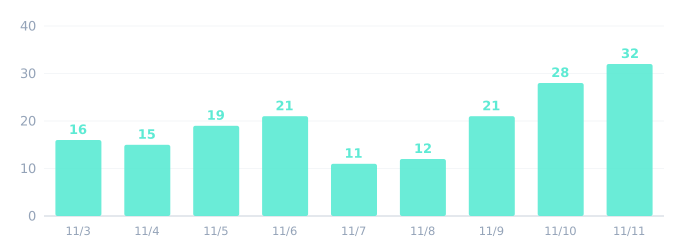
What $7.50 a day bought
The campaign ran from November 3 to November 11, 2026, in Korea time, for Android users in the United States. The app is Safe-Life, my free emergency go-bag app. I paid in Korean won, ₩10,000 a day.
| Number | Value |
|---|---|
| Cost before VAT | ₩89,020 |
| Impressions | 5,229 |
| Clicks | 521 |
| Installs | 175 |
| Clicks for each 100 impressions | 10.0 |
| Installs for each 100 clicks | 34 |
| Cost per click | ₩171 |
| Cost per install | ₩509 |
Dollar amounts in this post convert at ₩1,340 to the dollar, close to the rate during the campaign, so ₩509 is about $0.38.
₩509 per install was below the low end of two agency benchmark ranges. Those pages give ranges for Android utility apps: $0.60 to $2.00 per install in the United States, and $0.80 to $2.50 in Tier 1 countries. I had planned for 16 to 80 installs, at $0.80 to $4.00 each, and I got 175.
Day by day:
| Date | Cost | Installs | Cost per install |
|---|---|---|---|
| Nov 3 | ₩10,920 | 16 | ₩683 |
| Nov 4 | ₩11,618 | 15 | ₩775 |
| Nov 5 | ₩9,788 | 19 | ₩515 |
| Nov 6 | ₩9,522 | 21 | ₩453 |
| Nov 7 | ₩8,618 | 11 | ₩783 |
| Nov 8 | ₩8,517 | 12 | ₩710 |
| Nov 9 | ₩9,533 | 21 | ₩454 |
| Nov 10 | ₩10,087 | 28 | ₩360 |
| Nov 11 | ₩10,416 | 32 | ₩326 |
The campaign settings to copy
One campaign with one ad group.
| Setting | Value |
|---|---|
| Campaign type | App promotion, app installs |
| Platform | Android |
| Location | United States |
| Language | English |
| Bidding | Install volume, no target cost per install |
| Daily budget | ₩10,000 |
| Dates | November 3 to November 11, 2026 |
| Uploaded assets | 3 videos, 6 images, 5 headlines, 5 descriptions |
Is a budget below Google's guidance enough?
My ₩10,000 budget was about a tenth of Google's formula at a $1.50 target, and the ads still ran every day. Google's tips page for app campaigns says to set the daily budget at 50 times your target cost per install. If you aim at $1.50 per install, a middle value of those benchmarks, that is $75 a day, about ten times my budget. So I set no target and picked the install volume focus.
The first days may cost more. My first four days cost ₩589 per install and the next four ₩510, and the same page says that the cost per install may be inflated in the first days or even weeks.
Google's checklist for app campaigns asks you to leave a new campaign alone for at least 10 days. My spending cap allowed only nine days, and I did not change the budget or the bidding in that time.
Do you need Firebase or an SDK to count installs?
For Android installs from Google Play, you need no SDK: Google Ads counts those installs as conversions by itself. My app has no analytics or ad SDK, and I did not add one for the ads. After I linked the Play app to the ad account, Google created the install conversion automatically. Google's help page also says that this conversion needs no tracking code in the app.
Google counts a Google Play install at the download, which is not the same as a first open of the app.
To get the report into your own program each day, see Google Ads API With Test Access Only.
How to check that the installs are real
Compare the installs that Google Ads reports with the installs that Google Play counts for the country. Play counts installs from every source, ads or not. Play counted 12 US installs in the 62 days before the ads, and 133 in the first 7 days with the ads on.
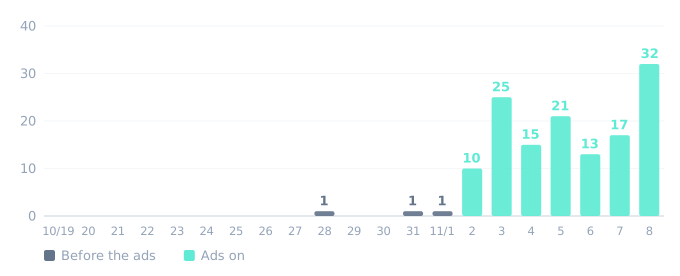
For about the same seven days, November 3 to 9 in Korea time, Google Ads reported 115 installs. Play's count is higher, and before the ads the United States gave about one install every five days. So Play's own count backs up the Google Ads number.
When you compare, remember that the two reports use different days. Play counts installs in Pacific Time, so the first 17 hours of November 3 in Korea fall on Play's November 2. That is why the "Ads on" bars start one day before the campaign's start date.
Play's numbers for each country also arrive later than the Google Ads report. On November 14 they ended at November 8, so the chart ends there.
App campaign assets: store screenshots and videos
An app campaign builds its ads from your uploads and from assets of your store listing, and the screenshots are among those store assets. Google's help pages name no way to turn them off. So open your Play listing in the language of the country you target, and look at each screenshot as if it were the ad.
For the video ads, I uploaded my own: three of about 11 seconds with captures of the real app, one each in vertical, square and horizontal format. Without them, Google Ads may make a video ad from your campaign assets and your store listing, and Google's help says that the system stops doing this when you upload your own videos. Upload at least one video of your own if you want to decide what the video ad shows.
How to work out the most the campaign can cost
On a postpaid account, the daily budget and the end date are what set a firm cap on the spend. Postpay charges after the ads run: Google charges the card on the first day of each month or when the costs reach the payment threshold. When the card limit makes a payment fail, the ads may stop, but the costs up to that point have already accrued. My account was on postpay, and the switch to prepaid billing was grayed out.
Google says that on any one day you never pay more than two times the average daily budget for most campaigns. So at ₩10,000 a day for 9 days, the worst case is ₩180,000, or ₩198,000 on an account that pays the 10% Korean VAT.
The real spend stayed near the budget. The most expensive day cost ₩11,618, 16% over the daily budget.
My campaign stopped by itself on its end date: the report has no impressions after November 11. Set the end date when you create the campaign.
FAQ
Do the totals change after the campaign ends? Mine did. I read the same nine days on November 12 and on November 14, and the totals went from ₩89,991 and 176 installs to ₩89,020 and 175 installs. For November 3 to 9, the cost was ₩972 lower and the installs were 2 fewer, and the last two days gained 1 install. Read the totals again a few days after the end date before you quote them.
Sources
Campaign dates are in Korea time, the time zone of the ad account. Google Play dates are in Pacific Time, as Play Console reports them.
- Google Ads Help, Tips for maximizing your App campaign
- Google, App campaigns for installs checklist
- Google Ads Help, Measure app conversions with Google Play
- Google Ads Help, About App campaigns
- Google Ads Help, Asset types for App campaigns
- Google Ads Help, About auto-generated video ads
- Google Ads Help, About average daily budgets
- Google Ads Help, About payment settings in Google Ads
- Google Ads Help, Resolve a declined payment in Google Ads
- Google Ads Help, Taxes in your country
- Play Console Help, View app statistics
- SEM Nexus, CPI Benchmarks by App Category and Platform: 2026 Data
- Admiral Media, Mobile App Marketing Benchmarks 2026