Google Ads API With Test Access Only: Get Your Account's Numbers Daily With an Ads Script
TL;DR
- Since September 9, 2026, the access level of your Google Cloud project, not a developer token, decides what the Google Ads API lets you do.
- A project with Test access gets
CLOUD_PROJECT_NOT_APPROVED_FOR_PRODUCTIONwhen it queries a live ad account. - My Explorer access request was denied at once, and Basic access requires Explorer access first.
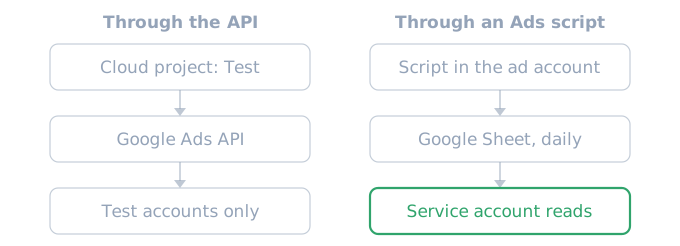
- If you only read your own account, a Google Ads script is the right tool: it writes the numbers to a Google Sheet each day, and a service account reads the sheet.
A Google Cloud project with Test access gets CLOUD_PROJECT_NOT_APPROVED_FOR_PRODUCTION when it queries a live Google Ads account. If you only need your own account's cost, clicks and conversions, you may not need the Google Ads API at all. A Google Ads script runs inside the ad account and writes the numbers to a Google Sheet each day. Your program then reads that sheet with a service account.
Test access and live accounts
The Google Ads API sunset developer tokens on September 9, 2026. Before that, each developer token sent with API requests had its own access level. Since then, each Google Cloud project has an access level, and that level decides what the API lets the project do. There are four levels.
| Access level | Live accounts | Daily API operations limit |
|---|---|---|
| Test | No | 15,000 on test accounts |
| Explorer | Yes | 2,880 on live accounts |
| Basic | Yes | 15,000 |
| Standard | Yes | Unlimited |
A project with Test access can only send requests to test accounts. From API v25, a query to an account that runs real ads fails with this error. In v24 and earlier, the same case returns ACTION_NOT_PERMITTED.
AuthorizationError.CLOUD_PROJECT_NOT_APPROVED_FOR_PRODUCTION
Google gives two fixes. If you are testing, make sure the request goes to a test account. If you need a live account, raise the project's access level to Explorer or higher on the Google Ads API overview page of the Cloud console.
When the Explorer request is denied
You have to apply for Explorer access. Google's page says that review and approval are automated in most cases, but it does not promise an upgrade. I applied on November 2, 2026, and the request was denied at once. The only reason on the screen was that the project does not meet the eligibility criteria. The access level page gives neither the criteria nor a rule for applying again.
Basic access requires Explorer as your current level, so a denied Explorer request also blocks the path to Basic. Basic also requires brand verification for the Cloud project.
If a person only looks at the numbers, you need neither the API nor a script. Google's official Google Ads app for Android and iOS shows key metrics and campaign status, and it can alert you to changes such as low budgets or disapproved ads.
I wanted my own program to fetch one ad account's numbers each day, and I had no plan to change campaigns through the API. So I did this job with a Google Ads script instead of the API.
What an Ads script needs
Google runs Google Ads scripts on its own servers, inside the ad account. Google's guide says that all you need is a Google Ads account, with no developer credentials to manage. The access level belongs to programs that call the API through a Cloud project. A script is a feature for the account owner inside the account, so it needs no Cloud project. In my account, the script read the live account's numbers with no problem. Scripts also cost nothing extra.
Inside a script, AdsApp.search() takes a query in GAQL, the same query language as the Google Ads API. You can schedule a script hourly, daily, weekly or monthly. If you only need to copy a report into a sheet as it is, AdsApp.report() has exportToSheet(). I used AdsApp.search() and wrote the rows myself, to convert cost to currency and to name the columns.
Writing the numbers to a sheet each day
This is the part of my script that writes each campaign's daily numbers to the sheet. I kept only a few columns and replaced the sheet URL and the service account address with placeholders.
var SHEET_URL = '';  // after the first run, paste the sheet URL from the log
var READER = '[email protected]';
var START_DATE = '2026-11-01';

function main() {
  var ss = SHEET_URL ? SpreadsheetApp.openByUrl(SHEET_URL) : SpreadsheetApp.create('ads-daily');
  Logger.log('Sheet: ' + ss.getUrl());
  var viewers = ss.getViewers().map(function (u) { return u.getEmail(); });
  if (viewers.indexOf(READER) < 0) ss.addViewer(READER);

  var tz = AdsApp.currentAccount().getTimeZone();
  var today = Utilities.formatDate(new Date(), tz, 'yyyy-MM-dd');
  var query =
    'SELECT segments.date, campaign.name, metrics.impressions, metrics.clicks, ' +
    'metrics.cost_micros, metrics.conversions FROM campaign ' +
    "WHERE segments.date BETWEEN '" + START_DATE + "' AND '" + today + "' " +
    'ORDER BY segments.date';

  var rows = [['date', 'campaign', 'impressions', 'clicks', 'cost', 'conversions']];
  var it = AdsApp.search(query);
  while (it.hasNext()) {
    var r = it.next();
    rows.push([r.segments.date, r.campaign.name, Number(r.metrics.impressions || 0),
               Number(r.metrics.clicks || 0), Number(r.metrics.costMicros || 0) / 1e6,
               Number(r.metrics.conversions || 0)]);
  }
  var daily = ss.getSheetByName('daily') || ss.insertSheet('daily');
  daily.clearContents();
  daily.getRange(1, 1, rows.length, rows[0].length).setValues(rows);
}
Each run rewrites everything from the start date to today. A skipped day or a second run in one day leaves the sheet correct. The query names fields with underscores (cost_micros), but the result rows use lowerCamelCase (costMicros). Cost comes in micros, so divide by 1,000,000 to get the account currency. In a campaign that counts app installs as conversions, like mine, conversions is the install count.
The first real numbers reached my sheet in the run at 6:21 a.m. KST on November 3, 2026. Here is that row with only the columns of the code above and a shorter campaign name.
date        campaign            impressions  clicks  cost        conversions
2026-11-03  us-android-install  47           5       856.496924  2
The cost has digits below one won because it is a micros value divided by a million. This row holds only the first six hours or so of November 3. The next run rewrites the same date's row, and the numbers fill in.
You add the script in the Google Ads UI under Tools, Bulk actions, Scripts. The first run asks you to authorize the script. After that, one run creates the sheet and prints its URL in the log. Paste that URL into SHEET_URL before you schedule the script daily. While the URL is empty, every run creates a new sheet.
Let the script create the sheet
At first I made the sheet by hand and put its URL in the script, and the script stopped with No item with the given ID could be found. I could not find the cause of this error in Google's docs. So I left SHEET_URL empty and let the script create the sheet with SpreadsheetApp.create(), and the script opened that sheet with no error. Paste the URL from the log into SHEET_URL, and later runs write to the same sheet.
If you get the same error, have the script make the sheet itself. The script's addViewer() call also shares the sheet with the service account.
Reading the sheet with a service account
The reader uses the Google Sheets API, not the Google Ads API. Turn on the Sheets API in your Cloud project, and request only the read-only scope with your service account1 key. SHEET_ID is the part of the sheet URL between /d/ and /edit. In Python:
from google.auth.transport.requests import AuthorizedSession
from google.oauth2 import service_account

SHEET_ID = "<sheet ID>"
creds = service_account.Credentials.from_service_account_file(
    "key.json", scopes=["https://www.googleapis.com/auth/spreadsheets.readonly"]
)
s = AuthorizedSession(creds)
url = f"https://sheets.googleapis.com/v4/spreadsheets/{SHEET_ID}/values/daily!A:F"
rows = s.get(url).json().get("values", [])
The service account can only view the sheet, so it cannot change it. I connected the sheet to a status summary that I open when I need it.
What to watch when you read the numbers
Google Ads records a conversion on the date of the ad click. If someone clicks yesterday and installs the app today, yesterday's row grows later. A script that rewrites from the start date each day picks up that growth. Still, expect the most recent days to grow more than older ones. To count by the date of the conversion, query metrics.conversions_by_conversion_date.
A script runs only on its schedule or when you start it in Google Ads. A service that must query the ad account on each user request cannot use a script, so apply for Explorer access first.
FAQ
Does a preview run create the sheet too?
Yes. Google's docs say that preview mode only holds back calls that use AdsApp, and other services such as spreadsheets change as normal. So while SHEET_URL is empty, each preview creates a new sheet.
Can a script change campaigns too?
Yes, Ads scripts can both read and change campaigns. The script above only reads with AdsApp.search() and has no code that changes a campaign.
Sources
Dates from Google's docs are as the docs print them, with no time zone given.
- Google Ads API, Access Levels and Permissible Use
- Google Ads API, Common errors
- Google Ads API, AuthorizationError
- Google Ads scripts, Get started
- Google Ads scripts, AdsApp.search
- Google Ads scripts, Reports
- Google Ads scripts, Preview mode
- Google Ads API, Metrics (v25)
- Google Ads Help, Understand conversions by time with new columns
- Google Ads Help, About the Google Ads mobile app