Publishing a Wear OS Watch Face on Google Play in 2026 - WFF, AAB, and Two Rejections
TL;DR
- Since January 2026, Wear OS watch faces must use WFF (declarative XML), so the AAB carries resources and no code.
- AGP still compiles the generated
Rclass into a dex that gets the bundle rejected: enableminifyand disableshrinkResources. Editableinwatch_face_info.xmldefaults tofalse. Leave it out and the Edit button disappears, so reviewers reject the face as missing features.- Play Console has no pre-submission checklist, so run the WFF validator, bundletool and Memory Footprint Evaluator yourself.
We shipped a paid watch face project on Google Play. Our pipeline generates WFF XML from a custom design DSL instead of Watch Face Studio, so we had to touch every part of the store requirements and the AAB structure ourselves.
2026 is an interesting time to ship a watch face. WFF (Watch Face Format) became required for installing watch faces on all Wear OS devices in January, and the 64-bit requirement for Wear OS apps started applying on September 15. The documentation exists, but in practice you get stuck in places the docs don't cover. This post is a record of exactly where.
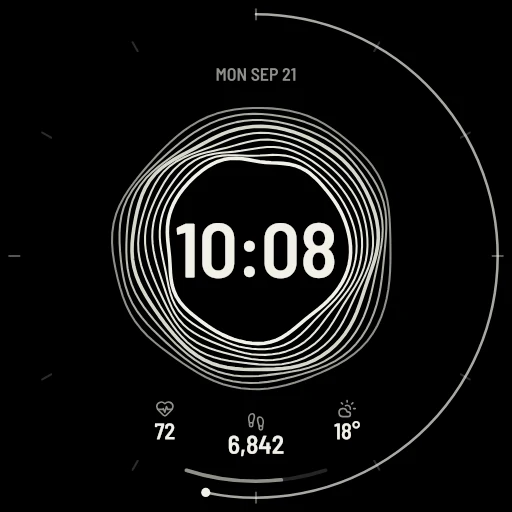
The rules that matter in 2026
- WFF required - Since January 2026, installing a watch face on any Wear OS device requires WFF (declarative XML). The old approach of shipping rendering code in the app is blocked for new installs.
- 64-bit requirement (from Sept 15) - Wear OS apps that include native code must ship 64-bit builds too. WFF watch faces carry
hasCode="false"with no native code, so this didn't directly apply to us - it's mainly a concern for Wear apps that ship native binaries (.so). - Icon spec WO-G4 - In effect since July 15, 2026. A single-watch-face app icon must show the face centered, circular, scaled to touch the icon edges, with no extra text or device frames.
- Target API - Wear OS apps need to target API 35+ (phones need 36). If you don't declare
targetSdk, the merged manifest can end up with the same value asminSdk- which fails Play's requirement.
There is no checklist in Play Console
Easy to assume, but there's no "watch face requirements checklist" screen anywhere. The actual flow:
- Setup → Advanced settings → Form factors → add Wear OS
- Follow the prompts to upload a Wear OS screenshot and your AAB to a test track
- Back in Advanced settings, Wear OS → Manage → opt in to distribution
- When creating a release, pick Wear OS only in the form factor dropdown and ship on the
wear:track
Requirement checks don't happen in that UI - they happen during review. To pre-verify, you have to run Google's separate published tools locally (covered below).
The AAB is not structured like a normal app
A WFF watch face bundle is a package of resources, not code. What actually went in:
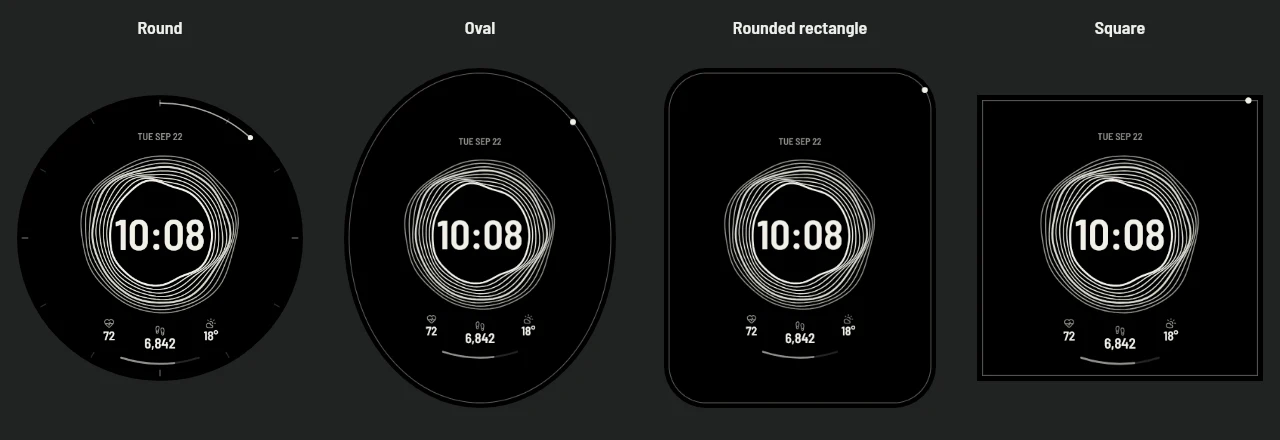
AndroidManifest.xml-hasCode="false",uses-feature android.hardware.type.watchres/raw/watchface.xml- the WFF scene: hands, text, Transform expressions, five palette<Flavors>presets, complication slotsres/raw-round/,res/raw-notround/- layout variants per device screen shaperes/xml/watch_face_info.xml-Editable,MultipleInstancesAllowed,Providerdeclarationsres/xml/watch_face_shapes.xml- which screen shapes are supported
Two spots in this structure produced our actual rejections.
Trap 1: a dex file appears even with zero code
bundletool rejected our first AAB: "Watch face with minSdk >= 33 cannot have dex files."
Odd, because the project contains not a single line of source. With hasCode="false", why is there a dex? It turns out AGP compiles the generated R class into a dex. R is generated for every project regardless of source.
The fix is counterintuitive:
buildTypes {
    all {
        isMinifyEnabled = true      // used to remove the dex, not to obfuscate
        isShrinkResources = false   // on: the shrinker strips WFF resources
    }
}
With minify on, R8 empties the dex so validation passes. With shrinkResources on, the resource shrinker decides WFF XML is unused and deletes it. "Enable optimization + disable resource shrinking" is not an answer you arrive at without hitting this wall.
Trap 2: rejected twice with the same message
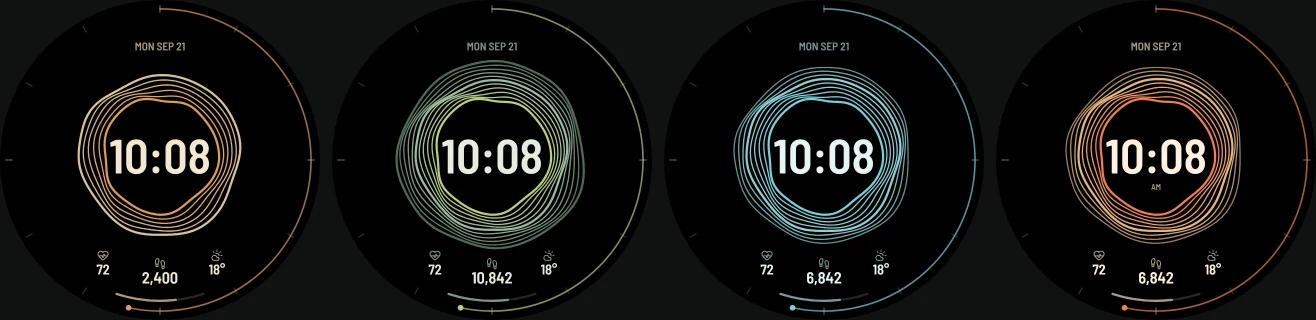
vc2 (1.1.0) got rejected: "The Wear app features don't work as described." Our listing promised five palettes and three customizable complication slots - which the reviewer couldn't find.
Our first guess was watch_face_shapes.xml. It only declared CIRCLE, and on any non-round device or configuration used in review, the face never appears in the picker at all. We added RECTANGLE and uploaded vc3.
Same rejection. Again.
![The actual rejection email - for vc3 it says the app "does not provide Five palettes [...] and Three customizable complication slots" from the store listing](/images/blog/wear-os-watchface-play/rejection-email.webp)
Digging further, the actual cause was watch_face_info.xml. A customizable watch face must declare <Editable value="true"/> - and this attribute defaults to false. Without it, Wear OS hides the "Edit" button on the watch entirely, so the reviewer could not reach the customization screen at all. The shapes issue was real but secondary; this was the primary cause.
What changed in vc4 (1.1.2):
<Editable value="true"/>inwatch_face_info.xmlMultipleInstancesAllowedset totrue- the validator required it when using FlavorsscreenReaderTexton every configuration element (TalkBack accessibility; noteComplicationSlotdoes not allow it - the official validator rejects it there)watch_face_shapes.xmldeclares bothCIRCLEandRECTANGLE
That version passed review and is live on Play now.
The screen the reviewer never saw
For reference, this is what was unreachable - four of the five palette presets. They were inside the AAB all along; a missing Editable declaration meant the customization screen simply could not be opened.
Three official tools we ran before submitting
Before submitting, we ran three official tools that each catch different problems:
- WFF validator - checks the XML against the WFF schema. You have to validate all three variants:
res/raw,raw-round, andraw-notround - bundletool -
build-apksconfirms the AAB converts to APKs and enforces package rules like the dex ban - Memory Footprint Evaluator - the tool Play itself runs: ambient ≤10MB, active ≤100MB
Beyond those, we built our own AOD preflight that samples 288 combinations (every 10 minutes across a day, both time formats, largest text, contour AOD) and measures the lit-pixel ratio. The official limit is 15% - our measured maximum was 3.36%, comfortably under it.
The last remaining manual step in publish automation
We scripted the upload with a service account (play-publish.ts): uploads the AAB, updates listings, rolls the release onto wear:internal and wear:production.
But once an app has been rejected, API commits land with changesNotSentForReview=true. The review request does not go out automatically - you have to click "Send changes for review" manually in Play Console → Publishing overview. We aimed for full automation and a single click remained.
Summary
- A WFF watch face AAB is resources, not code - and ironically, having a dex is what gets you rejected
Editableinwatch_face_info.xmldefaults to false - miss it and the Edit button disappears, and reviewers conclude the feature doesn't exist- Any screen shape missing from
watch_face_shapes.xmlremoves the face from the picker on that device class - There's no pre-submission checklist in Play Console, so running the official tools yourself is the practical safeguard
- Approved at vc4 after two rejections - identical wording, different causes
If you're about to publish a watch face, check Editable and shapes first. That's where we spent most of our review cycles.
The final watch face that went through the AAB structure and review process described in this post is Ridgeline on Google Play.
Tools used
- JDK 17 + Gradle 8.9 + bundletool (kept in
~/toolchains- the system JDK 8 can't run AGP 8) - Google's official WFF validator + Memory Footprint Evaluator (github.com/google/watchface)
scripts/play-publish.ts- service-account AAB upload/release with dry-run support- Custom AOD luminous-pixel preflight - 288 sampled combinations
References
- WFF documentation - required since January 2026
- Wear OS app quality - includes icon spec WO-G4
- 64-bit requirement announcement - applies from September 15, 2026
- Play Console watch face publishing
FAQ
Q. Does Watch Face Studio hit the same traps?
Since Studio handles the packaging, you're unlikely to hit the dex problem that comes from hand-building the AAB. But Editable/customization declarations and listing-vs-actual feature mismatches can fail review regardless of the tool.
Q. Is a paid watch face reviewed more strictly? Payments/merchant setup is a separate track; the review itself centered on feature behavior and quality. Both of our rejections were "features don't work as described."