How Often Should You Update Your Router's Firmware?
TL;DR
- It depends on the maker: in the 12 months to November 27, 2026, the typical ASUS router got 4 firmware updates, the typical TP-Link router 1 and the typical ipTIME router 23.
- 22 of the 49 supported TP-Link routers that safeuntil tracks got no firmware update in those 12 months.
- Most ASUS and TP-Link updates fixed security flaws: the release notes list a security fix for 99 of 118 ASUS updates and 39 of the 44 TP-Link updates whose notes safeuntil read; ipTIME fixed security flaws in 14 of its 30 releases.
- Check your router for new firmware about once a month, and install it when there is one.
It depends on the maker. In the 12 months to November 27, 2026, the typical ASUS router got 4 firmware updates, the typical TP-Link router got 1, and the typical ipTIME1 router got 23. In that time ipTIME put out 30 releases, each for its own set of models, and 14 of them fixed security flaws. Check once a month, or turn on automatic updates if your router has them.
Updates per router in one year
I took the routers that my site safeuntil tracks whose updates have not ended, and counted the firmware updates each one got from November 28, 2025 to November 27, 2026. For ASUS and TP-Link, the dates come from each model's US download page, and I counted only models whose first firmware is older than those 12 months. For ipTIME, the dates come from the release posts on its download board, and each post counts as one update for every model it has a file for.
Netgear and Linksys are not counted, because safeuntil does not hold their full list of past updates. "Typical" here means the middle router when a maker's routers are lined up by their count.
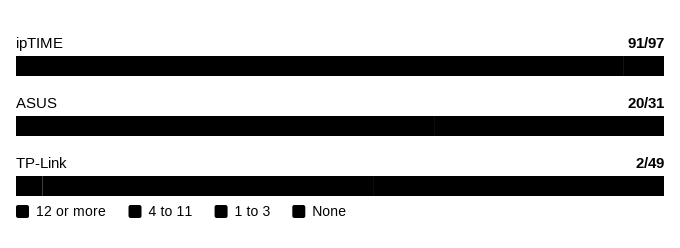
The bars count releases, not changes. Most ipTIME releases go to more than 100 models at once, so one release can change little on a given model.
24 of the 31 ASUS routers got 3 to 5 updates in the year. The RT-AX86U Pro, for one, got updates on March 24, May 4, September 22 and October 22, 2026. No ASUS router in the count went the whole year without one, and none got more than 6.
TP-Link updated its routers the least often. 22 of the 49 TP-Link routers got no firmware in those 12 months. The Archer AX21 v4.6 is one of the 22: its newest firmware came out on September 23, 2025, and its US page lists four updates from August 2023 to that date. Some TP-Link models moved faster: the Archer AXE75 got 5 updates in the same 12 months.
ipTIME is the opposite case. It posted 30 router firmware releases, at least one in every month, and 20 of them covered more than 100 models each. 91 of the 97 ipTIME routers in the count got 12 or more updates. The 97 are the routers, mesh units and extenders that safeuntil tracks and that ipTIME's firmware status page lists as launched before December 2025. The other 6 are older models that got one update in the year.
ipTIME's status page counts one more update for 33 of the 97, because they are missing from the download list of release 15.35.0 of June 10, 2026.
How many of those updates fix security flaws
Of the 118 updates that the 31 ASUS routers got, 99 list a security fix in their release notes. For TP-Link, it is 39 of the 44 updates whose notes I read. ipTIME's release posts list fixed security vulnerabilities in 14 of its 30 releases, and in every release from July 22, 2026 on. Its 16.01.2 firmware of November 17, 2026, for one, fixed 23 vulnerabilities on 112 models.
A router that skips a year of updates misses many of those fixes. The typical ipTIME router in the count got 12 of ipTIME's 14 releases with security fixes.
A long gap can mean the updates stopped
TP-Link has announced no end of updates for the 22 routers that got nothing in those 12 months. Still, a gap much longer than a year can mean that the maker stopped updating a model. Most makers give no end date while a router is still on sale, as why your router has no update end date explains. The makers set that end in different ways: see how long routers get firmware updates.
For older Wi-Fi 5 routers, is a Wi-Fi 5 router too old? shows which brands still update them.
Keep your router on current firmware
- Open your router's admin page or app and write down the firmware version and the exact model, with its hardware version if the label shows one.
- Look the model up on safeuntil. Its page lists the firmware updates found on the maker's pages, marks those whose notes list a security fix, and shows when updates end, or an estimate where the maker gives no date.
- Compare your version with the newest one on the maker's download page for that hardware version. Two routers with the same name can need different files, as router hardware versions explains.
- Install the newer firmware if there is one, and check again in a month.
FAQ
Can an ASUS router install updates by itself? Yes. ASUS's firmware help page says to turn on Auto Firmware Upgrade under Administration, Firmware Upgrade, and pick a time. When a new version is available, the router installs it at that time.
Do the counts include beta firmware? No. ASUS labels beta builds on its download page, and safeuntil leaves them out. None of ipTIME's router firmware posts in those 12 months was a beta.
Sources
- ASUS, RT-AX86U Pro firmware and How to update the firmware of your router to the latest version (WebGUI)
- TP-Link, Archer AX21 V4.6 download and Archer AXE75 V1 download
- ipTIME, firmware download board, router firmware 16.01.2 and firmware status (in Korean)
- safeuntil, routers