Works in Debug, Crashes on Launch in Release: Fixing an R8 Crash
TL;DR
- R8 usually runs only on release builds, so a crash caused by code R8 removed never shows up in debug builds, however much you test them.
- The error
Failed to create an instance of class androidx.work.impl.WorkDatabaseappears when R8 removes theWorkDatabase_Implconstructor. The keep rule of Room 2.5.0, which comes in with WorkManager, does not protect the constructor in R8 full mode. - A keep rule that names the constructor, or a direct dependency on
work-runtime2.11.2, fixes it, anddexdumpon the release APK shows whether the constructor survived. - Before you ship, install the signed release build on a real device and open it from a cold start.
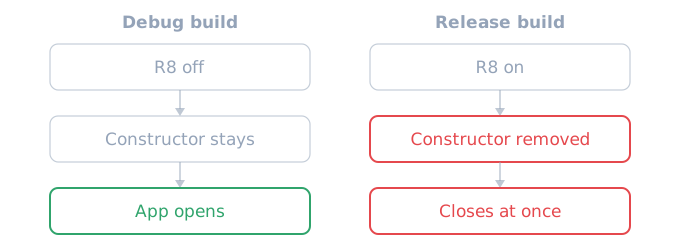
If an Android app opens fine in debug builds but closes at launch in release builds, suspect first that R8 removed code that only reflection uses. R8 usually runs only on release builds, so no amount of debug testing shows this crash.
What R8 is, and why only release builds break
R8 is Google's optimizer that shrinks code when an Android app is built. It removes code that the app and its libraries do not use, and it shortens class and method names to things like a.b.a (obfuscation). The app gets smaller and faster, so Google recommends always turning it on for release builds (optimization { enable = true } from Android Gradle plugin (AGP) 9.3, isMinifyEnabled = true before that). Debug builds usually leave it off.
R8 finds the code in use by following the calls written in the code. When a library creates an object from a class name by reflection, R8 sees code that nothing uses and removes it. Code that must stay has to be named in a keep rule. A class kept by a keep rule also keeps its name.
Why WorkManager crashes an app that never uses it
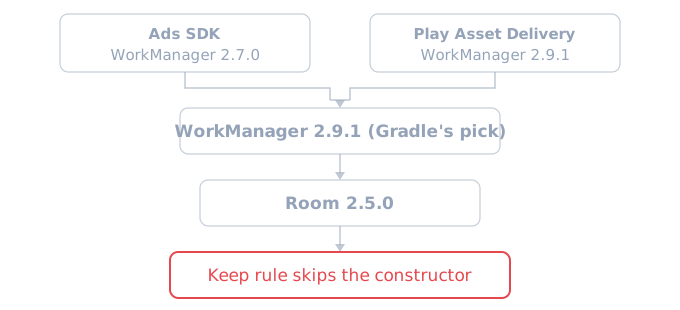
WorkManager is the Android library that schedules background work. It comes in with other libraries even when the app never uses it. For example, in an app with both the ads SDK and Play Asset Delivery, the ads SDK brings WorkManager 2.7.0, Play Asset Delivery brings 2.9.1, and Gradle picks the higher one, 2.9.1. Version 2.9.1 brings Room 2.5.0, a database library, with it.
This command shows which library brings which version:
./gradlew :app:dependencyInsight --configuration releaseRuntimeClasspath --dependency androidx.work:work-runtime
WorkManager initializes itself when the app starts and opens its Room database, and Room creates that class, WorkDatabase_Impl, by reflection. So if this constructor is gone, the app closes before its first screen appears. Play Console crash reports show lines like these. The .canonicalName at the end is part of the real message.
Caused by java.lang.RuntimeException: Failed to create an instance of class androidx.work.impl.WorkDatabase.canonicalName
  at androidx.room.Room.getGeneratedImplementation (Room.java:67)
Why the constructor goes despite a keep rule
The Room library ships its own keep rules for R8. Taken out of the two AAR files, the rules differ:
# room-runtime 2.5.0
-keep class * extends androidx.room.RoomDatabase

# room-runtime 2.7.0 (the Android file is named room-runtime-android)
-keep class * extends androidx.room.RoomDatabase { void <init>(); }
The 2.5.0 rule names the class but not the constructor. R8 compatibility mode, the default before AGP 8.0, also kept the no-argument constructor of a class kept this way. But R8 full mode, on by default since 8.0, does not, so it can keep the class and still remove its constructor. The 2.7.0 rule also names void <init>(); (the no-argument constructor), so the constructor stays.
How to fix the R8 crash
There are two fixes. The app rule keeps the constructor whatever the library version, and the version bump fixes the library's own rule. Doing both is the safe choice.
First, add a rule that keeps the constructor to the app's proguard-rules.pro:
-keep class * extends androidx.room.RoomDatabase { void <init>(); }
Then depend on work-runtime directly to raise its version. 2.11.2 brings Room 2.7.0, which has the rule above.
dependencies {
    implementation("androidx.work:work-runtime:2.11.2")
}
After the fix, run the command above with --dependency androidx.room:room-runtime at the end and check that Room is 2.7.0 or later.
How to check the release build for the constructor
You can look inside the release APK without a device. dexdump, in the Android SDK build-tools, lists the classes and methods in an APK. The keep rule leaves the name WorkDatabase_Impl as it is, so you can find the class by name and look for its constructor:
dexdump app-release.apk | awk '/Class descriptor.*WorkDatabase_Impl;/{f=1;next} /Class descriptor/{f=0} f && /<init>/'
A line that ends in : '<init>' means the constructor is there. If the class is in the APK but no line prints, the constructor is gone, and that APK closes as soon as it opens.
What to try on a release build before you ship
Do not count on Google Play review to open your app. The Play Console pre-launch report installs and runs the app on test devices, but it runs automatically only when its device lab has capacity. Before you ship, do these three things yourself:
- Install the signed release build on a real device and open it from a cold start. Install it from the Play Console internal test track, and you test the same file users get from Play.
- Before the upload, check with
dexdumpthat classes created by reflection still have their constructors. - If you upload an APK, upload the obfuscation mapping file (
mapping.txt) too. An app bundle built with AGP 4.1 or later already carries it. With it, Play Console crash reports show the original class names instead of the short names R8 made.
FAQ
Does turning R8 off in the release build fix it? With R8 off, nothing is removed, so this crash goes away. But the app gets bigger and its code stays readable. Google recommends always enabling app optimization for release builds, so keep R8 on and fix the keep rule instead.
Can other libraries cause the same crash?
Yes. Any class that only reflection creates can hit the same problem, whatever the library. The R8 compatibility FAQ also says to keep such classes explicitly with a keep rule. If only the release build fails with ClassNotFoundException or "Failed to create an instance", suspect R8 first.
Sources
- Room 2.5.0 AAR (
room-runtime-2.5.0.aar, Google Maven) - Room 2.7.0 AAR (
room-runtime-android-2.7.0.aar, Google Maven) - Android Developers: Enable app optimization
- R8 compatibility FAQ: R8 full mode
- Android Gradle plugin 8.0.0 release notes
- Play Console Help: pre-launch reports
- Play Console Help: deobfuscate crash stack traces