Not 1.19° but 1/4″ per foot: how the PitchFall slope level is different
TL;DR
- PitchFall reads slope in trade units, not degrees: inches per foot for pipe, x/12 for roof pitch, 1:n for ramps.
- 1/4″ per foot is 1.19°, a 6/12 roof is 26.57° and a 1:12 ramp is 4.76°, so a level that shows degrees leaves you converting.
- Set a target and it tells you whether you're on it, and when you're not, how much to fix in the same unit, like "Raise right end 3/32″".
- The Android app came out free on Google Play on November 10, 2026 (with ads); the iPhone app is not on the App Store yet.
PitchFall is a slope level app that reads in the units you build with, inches per foot for pipe, x/12 for roof pitch, 1:n for ramps, and when you're off target it tells you how much to fix, and on a pipe, which end to move. Where you can't see the screen, ticks and a buzz guide you, plus a beep with the ringer on. The Android app came out on Google Play on November 10.
Why degrees make you do the math again
Trade slopes don't land on round numbers in degrees. I worked out each angle below as the arctangent of rise over run.
| Trade unit | Slope (%) | Angle |
|---|---|---|
| Pipe 1/8″ per foot | 1.04% | 0.60° |
| Pipe 1/4″ per foot | 2.08% | 1.19° |
| Pipe 1/2″ per foot | 4.17% | 2.39° |
| Roof 4/12 | 33.33% | 18.43° |
| Roof 6/12 | 50.00% | 26.57° |
| Ramp 1:12 | 8.33% | 4.76° |
1/8″ and 1/4″ per foot are only about 0.6° apart. With a level that shows degrees, you still have to work out whether the 1.2° on the screen is the fall you wanted.
PitchFall shows the big number in the unit you pick for each mode. Pipe reads in inches per foot, %, mm/m, 1/n, 1:n or degrees. Roof reads in x/12, x/10 (the rise per 10 used for roofs in Korea), degrees or %, and ramps in 1:n, % or degrees. On a phone set to a US region, pipe starts in inches per foot and roof in x/12, and the slope %, angle and mm/m show under the big number.
How much to fix, in the same unit
Set a target and the top of the screen says ON TARGET, TOO FLAT or TOO STEEP. For pipe and roof, the fix shows in the unit you're reading, and in pipe mode it names the end to move. For a ramp, it says TOO STEEP and shows the maximum you set, like "Max 1:12".
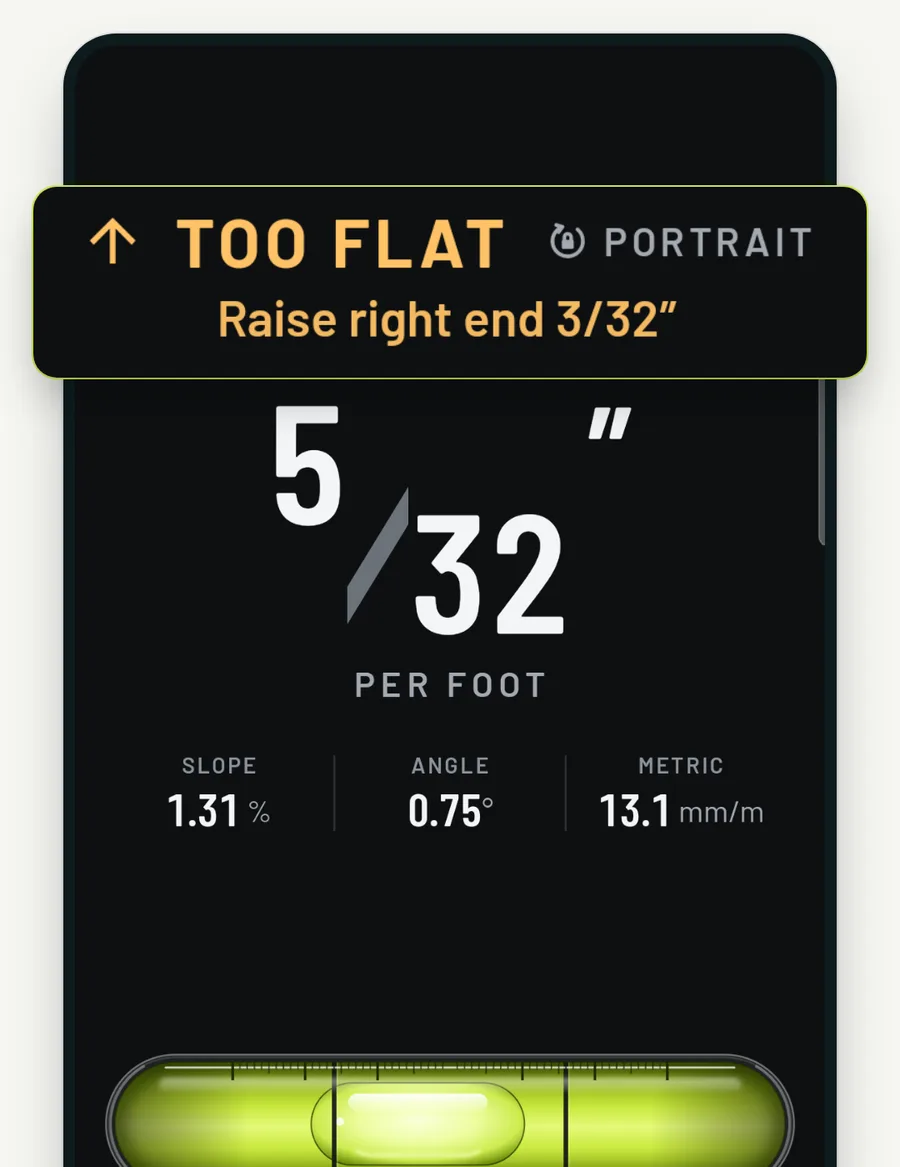
Here the target is 1/4″ per foot and the pipe reads 5/32″. The screen says to raise the right end 3/32″, the difference between the two, as a tape-measure fraction. Inches per foot always show as fractions like these, not decimals.
You pick a target from presets that come with a tolerance, or type your own. The minimum pipe fall and the maximum ramp slope depend on your local code, so check yours before you use a preset.
Under the sink, listen instead of looking
Some jobs put the screen out of sight, like a drain under a sink or a pipe above a ceiling. PitchFall ticks faster as you get close to the target, then beeps (with the ringer on) and vibrates when you're on it. Hold the phone still on an edge and the reading saves itself to the Log, so you can check it after you pull your hand out.
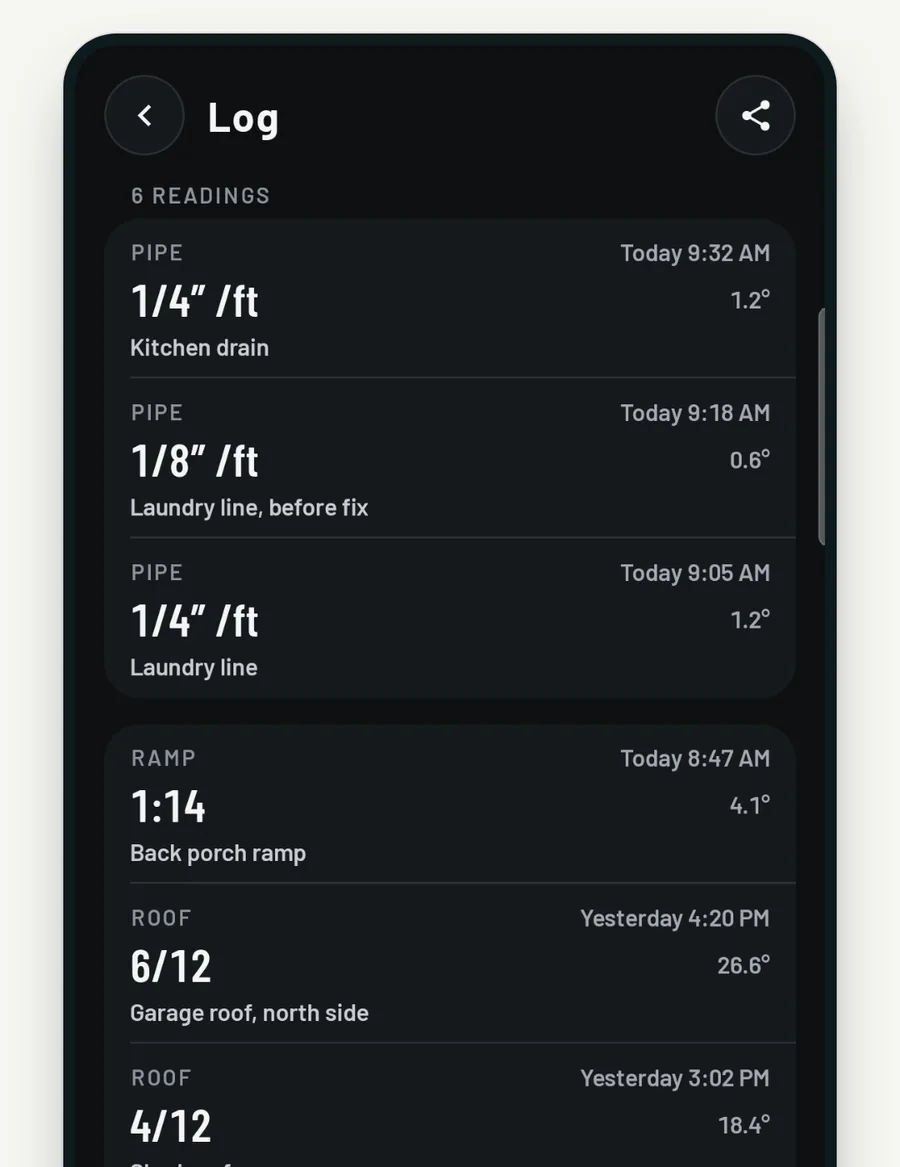
Each saved reading keeps its time and a note you can edit later. You can share the whole Log as a CSV file. No feature in the app is behind a payment, and the Log needs no account.
Calibrate for your phone and case in two steps
Depending on the case, a phone can read slightly off zero. PitchFall calibrates in two steps: measure, turn the phone end for end on the same spot, and measure again. The spot does not need to be level. Turning the phone flips the slope of the spot but not the phone's own error, so the average of the two readings is that error.
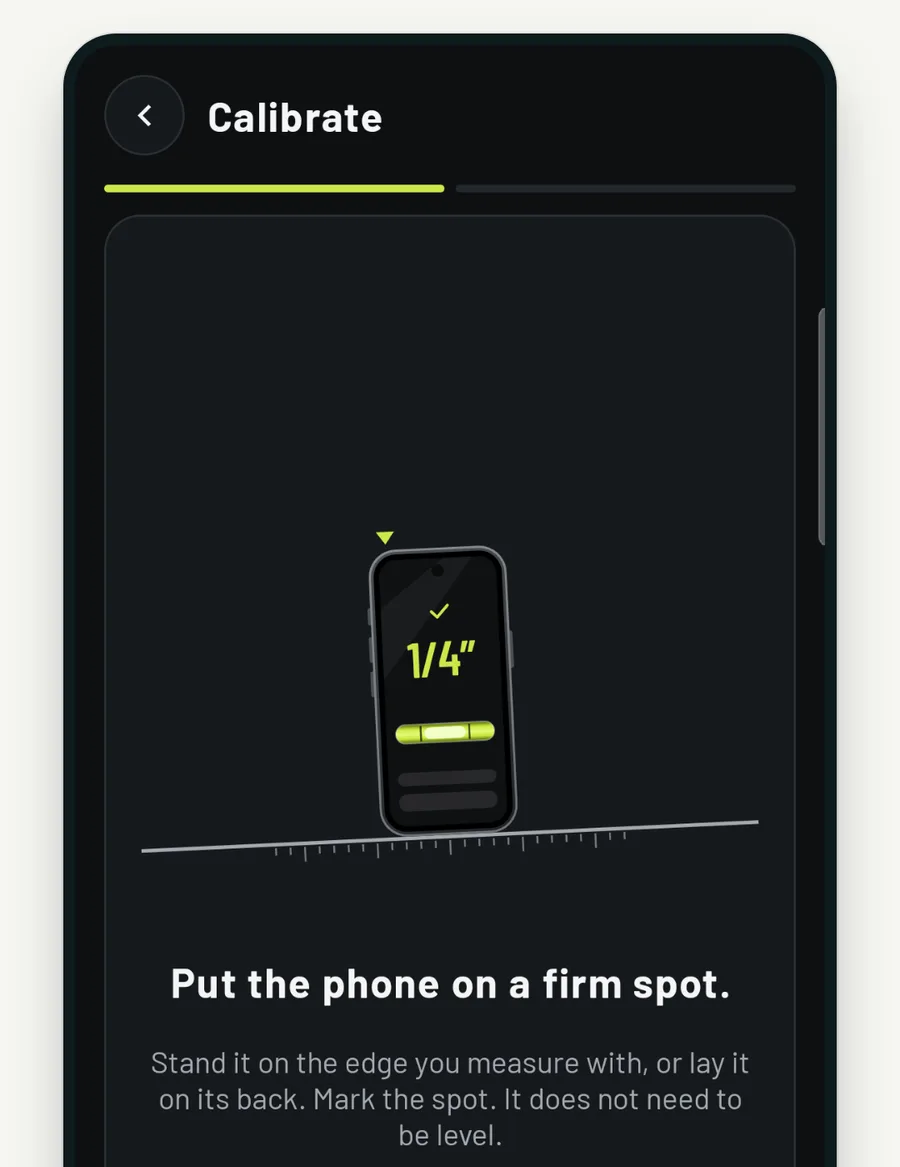
The offset is kept for each edge: short, long and back. If you change the case, calibrate again. Settings shows the stored offsets and can reset them.
Where to get it, and where the ads are
The PitchFall Android app is free on Google Play (Android 8.0 or later). There's no sign-up, and it measures with no signal. It goes online only to load ads. The ads are one banner at the top of the measure screen and one ad in the Log, and no full-screen ad opens while you measure. The iPhone app is not on the App Store yet.
When you first open it, calibrate, then set your target before you put the phone on the pipe.
FAQ
How accurate is a phone slope level?
I have not published a real-device accuracy test yet. Calibration reduces the offset that comes from your phone and its case, but for anything an inspector will check, confirm with your level too.
Sources
The Google Play date is the "Updated on" date of the PitchFall listing, which for this first version is its release date.
- PitchFall: Roof Pitch & Slope - Google Play